BDI: 1,842 ▼ 1.2%
COTTON NO.2: 84.12 ▲ 0.4%
LME COPPER: 8,432.50 ▲ 2.1%
FOOD SAFETY INDEX: 94.2 ARCHIVE_SECURED
OPTICAL INDEX: 11,204.09 STABLE
BDI: 1,842 ▼ 1.2%

SECTOR INDEX
V.24.08 ARCHIVE
Hot Articles
- Metro Station Noise Criteria: Limits and Measurement MethodsExplore metro station noise criteria, applicable limits and measurement methods. Learn how to select metrics and assess compliance with confidence.
- Kongsberg Maritime Unveils Arctic Hunter Unmanned Surface VesselKongsberg Maritime's Arctic Hunter unmanned surface vessel is proposed for the Royal Navy's Type 92 programme. Explore its technology and procurement implications.
- How Accurate Is AI in Food Quality Control? Metrics and Testing MethodsExplore AI in food quality control accuracy, from recall and false negatives to validation methods. Learn how to assess real-world inspection reliability.
IoT Home Security Buying Guide: Sensors, Cameras, Hubs, and Privacy Risks


Choosing the right IoT home security setup is no longer just about adding a camera at the front door. Today’s smart homes rely on connected sensors, cameras, hubs, apps, cloud services, and automation rules—all of which affect protection, convenience, cost, and privacy. This guide helps you compare the key components, understand what features matter most, and identify the hidden risks behind always-connected devices, so you can build a safer system that fits your home, budget, and comfort level.
For homeowners, renters, and family decision-makers, the challenge is balancing real protection with simple operation. A reliable IoT home security system should reduce uncertainty, not add more devices to manage.
G-MCE evaluates connected technology through a cross-industry lens, including sensors, optics, power reliability, wireless infrastructure, and data governance. That perspective is useful when consumer devices begin to resemble small technical ecosystems.
Understanding the Core Parts of an IoT Home Security System
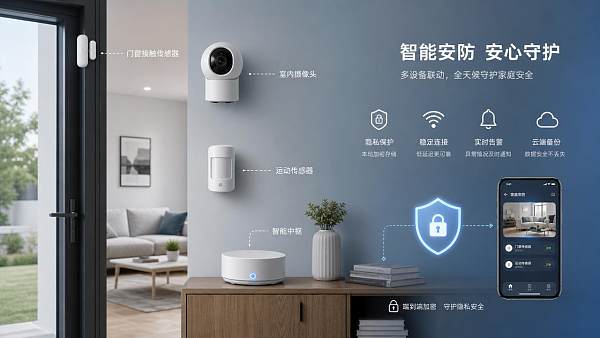
A practical IoT home security setup usually includes 4 connected layers: detection, verification, control, and response. Each layer affects false alarms, privacy exposure, and daily convenience.
Sensors: The First Layer of Detection
Door and window contact sensors detect opening events, while motion sensors monitor movement in rooms, halls, or garages. Most residential systems use 5–15 sensors depending on home size.
Look for tamper alerts, replaceable batteries, and response times under 2 seconds. For larger homes, signal range matters as much as sensor sensitivity.
Cameras: Verification, Evidence, and Deterrence
Cameras help confirm whether an alert is a real threat, a pet, a delivery, or a family member. Resolution, night vision, and storage policy are key purchase factors.
For most households, 1080p is sufficient for entryways, while 2K or 4K can help at driveways or wide outdoor areas. Higher resolution also increases bandwidth and storage needs.
Hubs, Apps, and Automation Rules
The hub connects devices and keeps routines coordinated. Some systems use a dedicated hub, while others rely on Wi-Fi, Bluetooth, Zigbee, Z-Wave, Thread, or Matter-compatible controllers.
A good IoT home security app should allow 2-factor authentication, shared user permissions, event history, device health checks, and automation rules that are easy to audit.
The table below compares common components and the decision points that matter during purchase, installation, and long-term ownership.
The key conclusion is simple: do not compare devices only by price. A lower-cost camera can become expensive if it requires paid storage or weakens privacy controls.
How to Choose Cameras, Sensors, and Hubs for Your Home
The best IoT home security configuration depends on property layout, household routines, internet reliability, and risk tolerance. A studio apartment needs different coverage than a 2-story house.
Start With 3 Security Zones
Think in zones: perimeter, interior, and high-value areas. Perimeter coverage includes front doors, back doors, sliding doors, and accessible windows on the first floor.
Interior coverage usually focuses on hallways or staircases, not every room. High-value areas may include an office, safe, equipment closet, or medication storage cabinet.
Recommended Starter Layouts
- Apartment: 1 door sensor, 1 indoor camera, 1 motion sensor, and app alerts.
- Townhouse: 2–4 contact sensors, 1 doorbell camera, 1 indoor camera, and a hub.
- Detached home: 6–12 sensors, 2–4 cameras, hub backup power, and optional monitoring.
A phased installation can reduce cost. Many households begin with 3–5 devices, then expand after 30 days of real alert history.
Evaluate Video Quality Beyond Resolution
Resolution is only one factor. Lens angle, dynamic range, compression, frame rate, and infrared distance strongly affect whether footage is usable at night.
For entry cameras, a 120–160 degree field of view is common. For long driveways, narrower lenses may capture faces and license plates more clearly.
Check Power and Network Resilience
Battery cameras are easy to install, but cold weather, frequent motion, and live viewing can shorten runtime. Wired cameras require more effort but reduce maintenance.
A dependable IoT home security system should tolerate short outages. Consider hubs with 12–24 hours of backup battery and cameras with local recording options.
Privacy Risks Behind Always-Connected Home Security Devices
Security devices protect your home, but they also collect sensitive data. Video, audio, timestamps, location, face events, and user routines can expose private behavior.
Cloud Storage and Data Retention
Cloud recording can be convenient, especially if a device is stolen. However, it creates dependency on vendor policy, subscription terms, encryption, and account security.
Before buying, check whether clips are stored for 7, 14, 30, or 60 days. Shorter retention may reduce exposure while still supporting incident review.
Account Access and Permission Control
Many privacy problems begin with weak accounts, not broken hardware. Use strong passwords, enable 2-factor authentication, and avoid sharing one login across several people.
A strong app should support role-based access. For example, one user may view live video, while another only receives arm and disarm notifications.
Device Lifecycle and Firmware Updates
Connected products need ongoing software maintenance. If a vendor stops firmware updates after 2–3 years, your IoT home security devices may become avoidable risks.
Choose brands that clearly state update policies, vulnerability response channels, and supported operating systems. Avoid products with vague app permissions or unclear ownership changes.
The following risk matrix helps compare privacy exposure before selecting hardware, apps, and subscription services.
The main lesson is to treat privacy as a buying specification. If a device cannot explain data handling clearly, it may not deserve access to your home.
Installation, Maintenance, and Daily Operation
Even strong equipment can perform poorly if installed incorrectly. Placement, network quality, notification settings, and periodic testing determine whether protection works during real events.
A 5-Step Setup Process
- Map entrances, blind spots, and high-value areas before buying devices.
- Test Wi-Fi strength at each planned sensor and camera location.
- Install sensors first, then cameras, then automation rules.
- Configure alerts by priority to avoid notification fatigue.
- Run a full system test every 30–60 days.
For Wi-Fi devices, aim for a stable signal at each device location. If alerts arrive late, add mesh nodes or relocate the router before adding more cameras.
Reduce False Alarms
False alarms often come from poor placement, reflective surfaces, pets, curtains, or outdoor vegetation. Adjust sensitivity before assuming the device is defective.
Set motion zones carefully and exclude sidewalks, roads, trees, and shared apartment hallways. A 10-minute tuning session can prevent weeks of unnecessary notifications.
Plan for Batteries and Subscriptions
Battery replacement is part of ownership. Contact sensors may last 12–36 months, while camera batteries may need charging every 1–6 months.
Subscription plans can affect video history, AI detection, emergency dispatch, and warranty coverage. Compare the 24-month cost, not just the device price.
Common Buying Mistakes and Practical Decision Rules
Many buyers focus on visible hardware and overlook system quality. In IoT home security, the app, update policy, network behavior, and privacy controls are equally important.
Mistake 1: Buying Too Many Cameras First
Cameras are useful, but they do not replace perimeter detection. A door sensor can trigger instantly, while a camera may only record after motion begins.
A balanced starting kit often includes 2–3 sensors for every camera. This ratio improves coverage while keeping bandwidth, storage, and privacy exposure manageable.
Mistake 2: Ignoring Interoperability
Closed ecosystems may be simple at first, but harder to expand later. Check whether devices support common protocols or work with your preferred voice assistant.
Matter, Thread, Zigbee, and Z-Wave can improve flexibility, but compatibility still depends on device category and vendor implementation. Always verify exact feature support.
Mistake 3: Skipping Household Rules
Technology cannot replace clear routines. Decide who can arm the system, when cameras record, and how guests, cleaners, or relatives receive temporary access.
Use 4 basic rules: separate user accounts, scheduled access, camera privacy zones, and monthly review of device permissions. These rules reduce both security and privacy problems.
Quick Decision Checklist
- Can the system work during a short internet or power outage?
- Does the app support 2-factor authentication and individual users?
- Are cloud storage terms, retention periods, and deletion controls clear?
- Can sensors, cameras, and hubs expand without replacing everything?
- Is the total 2-year ownership cost acceptable for your household?
Building a Safer, Smarter Home Security Plan
A strong IoT home security plan starts with measured coverage, not impulse purchases. Map risks first, then select devices that match your layout and comfort level.
Prioritize reliable sensors, clear camera placement, secure accounts, local fallback options, and transparent privacy policies. These choices usually matter more than one headline feature.
For consumers comparing connected home solutions, G-MCE’s technical benchmarking perspective can help translate device specifications into practical decision criteria across safety, reliability, and lifecycle risk.
If you are planning a new setup or upgrading an existing system, contact us to explore tailored IoT home security evaluation guidance and learn more solutions.
Recommended for You
 Digital SeaMetro Station Noise Criteria: Limits and Measurement MethodsExplore metro station noise criteria, applicable limits and measurement methods. Learn how to select metrics and assess compliance with confidence.By: Captain Kenji SatoNov 11, 2026
 Digital SeaKongsberg Maritime Unveils Arctic Hunter Unmanned Surface VesselKongsberg Maritime's Arctic Hunter unmanned surface vessel is proposed for the Royal Navy's Type 92 programme. Explore its technology and procurement implications.By: Captain Kenji SatoNov 10, 2026
 Sorting RobotsHow Accurate Is AI in Food Quality Control? Metrics and Testing MethodsExplore AI in food quality control accuracy, from recall and false negatives to validation methods. Learn how to assess real-world inspection reliability.By: Marcus SterlingNov 10, 2026
 UHV TransformersGE Vernova Selected for 6 GW HVDC Link in IndiaGE Vernova will design a 6 GW HVDC link for PGCIL, connecting Rajasthan and South Kalamb to support India's clean energy transition. Discover the project.By: Dr. Elena VoltNov 09, 2026
 Grid ResilienceEurope's Grid Compliance Standards in 2026: Generator Connection RequirementsExplore new grid compliance standards 2026 Europe projects must address, from generator connection rules to testing and documentation. Prepare for approval.By: Dr. Elena VoltNov 09, 2026
 Technical FabricsNonwoven Bonding Cost Data: Comparing Thermal and Chemical ProcessesExplore nonwoven bonding cost data to compare thermal and chemical processes, assess usable yield, and choose the best-value option for your application.By: Chloe DuboisNov 08, 2026
 Fiber LasersIndustrial Lasers to 2035: Automotive Lightweighting and Precision Welding Drive DemandExplore the industrial laser market outlook to 2035 and discover how automotive lightweighting and precision welding could shape demand and procurement.By: Dr. Hideo TanakaNov 07, 2026
 Technical FabricsChoosing Geotextile Under Railway Ballast: Key Performance RequirementsChoosing geotextile under railway ballast? Explore essential filtration, drainage, strength and durability criteria to make a confident, project-specific selection.By: Chloe DuboisNov 07, 2026
 Digital SeaChoosing Rail Welding Equipment for Maintenance: Field Conditions and Weld TypesChoose rail welding equipment for maintenance with confidence. Compare welding methods, field constraints, inspection needs, and lifecycle costs.By: Captain Kenji SatoNov 06, 2026
 Digital SeaIndia Broadband Forum Urges Stronger Submarine Cable ResilienceIndia’s submarine cable resilience is in focus as the Broadband India Forum urges faster repairs, more vessels and stronger landing infrastructure.By: Captain Kenji SatoNov 06, 2026
 Digital SeaChoosing a Railway Network Switch Supplier: Reliability and Support CriteriaChoosing a railway network switch supplier? Compare reliability, standards evidence, cybersecurity, and lifecycle support to reduce project risk.By: Captain Kenji SatoNov 05, 2026
 Grid ResilienceUS Grid Equipment Import Ban Raises Cost and Implementation ConcernsThe US grid equipment import ban raises concerns over costs and delivery delays. Explore how unclear criteria could affect procurement and supply chains.By: Dr. Elena VoltNov 05, 2026
 Digital SeaRailway Coupler Price: How Type and Specifications Affect QuotesRailway coupler price depends on type, specifications, and order scope. Learn how to compare quotes, avoid hidden costs, and make a confident buying decision.By: Captain Kenji SatoNov 04, 2026
 Grid ResilienceGlobal Smart Grid Companies Raise $3 Billion in First Nine Months of 2026Global smart grid companies raised $3 billion in the first nine months of 2026. Explore the funding breakdown and potential implications for buyers and suppliers.By: Dr. Elena VoltNov 04, 2026
 Digital SeaChoosing Wholesale Pet Toys: How to Evaluate Suppliers and Minimum OrdersWholesale pet toys: learn how to assess suppliers, compare minimum orders and landed costs, and reduce inventory risk before you buy.By: Captain Kenji SatoNov 03, 2026
 Digital SeaSustainable Packaging Design: How to Choose Materials and Reduce WasteDiscover how sustainable packaging design helps reduce waste, protect products, and control costs with practical material choices and proven testing strategies.By: Captain Kenji SatoNov 02, 2026
 Technical FabricsUSMCA's First Joint Review Puts Textile Supply Chain Rules in FocusUSMCA's first joint review puts textile supply chain rules in focus. Explore potential impacts on origin compliance, sourcing and tariff treatment.By: Chloe DuboisNov 02, 2026
 Digital SeaManufacturing KPI Benchmarking: How to Compare Production PerformanceBenchmarking KPI manufacturing performance? Learn how to compare OEE, quality and downtime, identify meaningful gaps, and turn insights into practical improvements.By: Captain Kenji SatoNov 01, 2026
 Smart MetersCCI Approves Adani Energy Solutions' ₹305 Billion Acquisition of IntelliSmartCCI approves Adani Energy Solutions' ₹305 billion acquisition of IntelliSmart. Discover what the deal could mean for India's smart meter market.By: Dr. Elena VoltNov 01, 2026
 Digital SeaChoosing a Coin Laundry Machinery OEM: What Buyers Should EvaluateChoosing a coin laundry machinery OEM? Compare machine specifications, payment integration, lifecycle costs, and support to make a confident buying decision.By: Captain Kenji SatoOct 31, 2026
 Grid ResilienceUS Energy Department Announces $237 Million Grid SCALED Funding ProgramExplore the DOE's $237 million Grid SCALED funding program and its goals to strengthen grid equipment supply chains, lower electricity costs, and improve resilience.By: Dr. Elena VoltOct 31, 2026
 UHV TransformersA Decade of UHV Power in Shandong: Province Leads in Station NumbersShandong UHV power leads China in station numbers. Explore a decade of grid development and its implications for electricity supply and business planning.By: Dr. Elena VoltOct 30, 2026
 Digital SeaChoosing a Composite Train Body Panel Manufacturer: Fire Safety and Quality ChecksChoosing a composite train body panels manufacturer? Learn how to verify fire test evidence, audit production quality, and avoid costly approval gaps before you buy.By: Captain Kenji SatoOct 29, 2026
 Subsea ROV/AUVOcean Infinity Deploys Six AUVs Together Beyond 5,000 MetresOcean Infinity reportedly deployed six HUGIN AUVs beyond 5,200 metres. Explore what concurrent deepwater missions could mean for seabed surveys and procurement.By: Captain Kenji SatoOct 29, 2026
 Grid ResilienceRenewable Energy Grid Balancing: How Storage and Demand Response Work TogetherExplore renewable energy grid balancing with storage and demand response. Learn how coordinated controls manage shortfalls, absorb surplus power, and improve grid reliability.By: Dr. Elena VoltOct 28, 2026
 Subsea ROV/AUVSeaber Introduces 13 kg RAVEN AUV to Target Mine Countermeasure CostsSeaber’s 13 kg RAVEN AUV targets lower mine countermeasure costs with two mission configurations. Explore its potential value for naval operations and procurement.By: Captain Kenji SatoOct 28, 2026
 Digital SeaBallast Water Management Rules: IMO vs. USCG Compliance RequirementsBallast water management rules explained: compare IMO and USCG approvals, operating limits, and records. Get practical checks to reduce compliance risks and costly port delays.By: Captain Kenji SatoOct 27, 2026
 Subsea ROV/AUVEni Signs Main Cronos Contracts, Moving Gas Project into ExecutionEni’s Cronos gas project enters execution as major contracts are signed. Explore the Cyprus development, Egypt processing plans and key milestones toward first gas in 2028.By: Captain Kenji SatoOct 27, 2026
 Digital SeaBenefits of Refurbished Semiconductor Equipment: When Do Savings Justify the Risk?Explore the benefits of refurbished semiconductor equipment. Learn how to weigh savings against process risks, qualification costs, and support gaps before investing.By: Captain Kenji SatoOct 26, 2026
 Digital SeaSemiconductor Equipment Overhaul: Diagnosing Persistent Process DriftSemiconductor equipment overhaul leaving process drift unresolved? Discover how to pinpoint vacuum, sensor, thermal, and conditioning issues to restore stability and reduce repeat service calls.By: Captain Kenji SatoOct 26, 2026
 Digital SeaSemiconductor Equipment Refurbishment Process: Cleaning to QualificationExplore the semiconductor equipment refurbishment process, from precision cleaning to qualification. Learn how measurable testing helps verify production readiness and reduce risk.By: Captain Kenji SatoOct 26, 2026